- intro
- how-to
- dear universe
How to send a manifest on Dear Universe: a step-by-step guide
A step-by-step guide to writing your manifest, choosing a date, picking a card style, confirming your email and coming back to report the result on Dear Universe.
Sending a manifest on Dear Universe takes less than five minutes. This guide walks you through every step so there is no guessing, from writing your first sentence to the day you come back and tell the universe how it went.
Step 1: Write your manifest
In the "What you want" box, write the way you would text your best friend. There is a 140-character limit, so keep it short. A few tips to make the sentence easier to act on:
- Be specific: "I run 5 km without stopping" beats "I get fitter".
- Write something within your own control, something you can do yourself.
- Write it as if it is already on its way: "By the end of the year I have $2,000 saved".
Not sure what to write? Tap one of the suggestions just under the box, or browse 20 sample manifests and change one to fit you. If you want to write a really good one, read how to write a manifest.
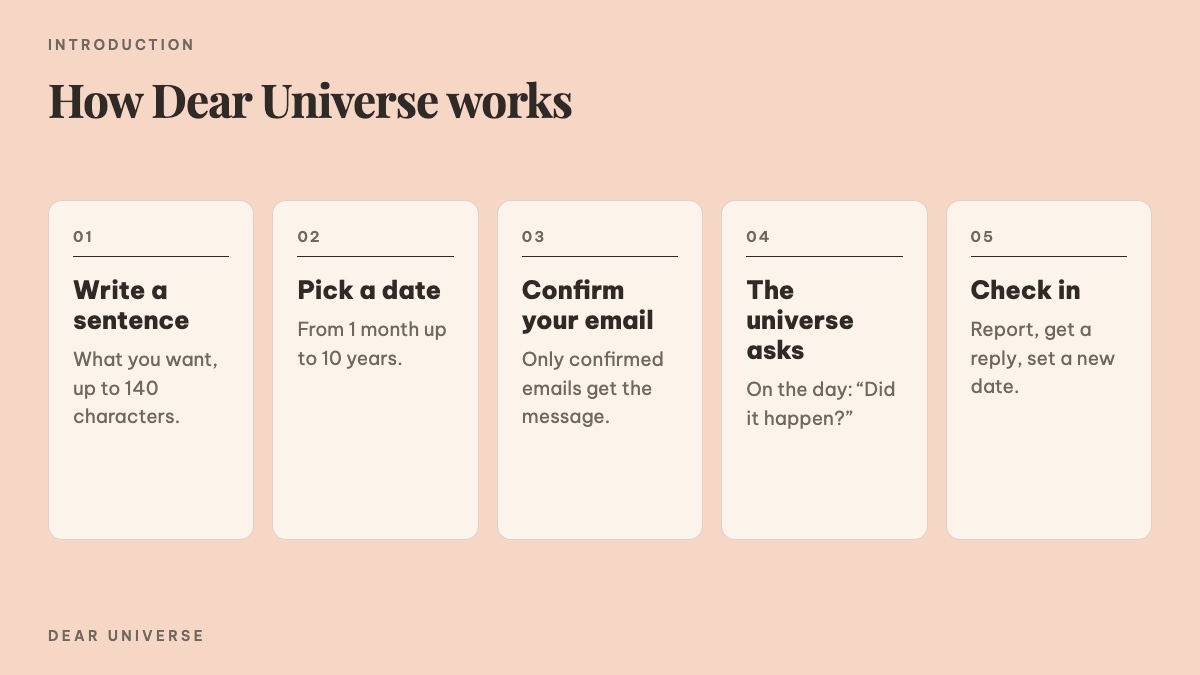 The five steps of Dear Universe: write one sentence, pick a date, confirm your email, the universe writes on the day, check in and set a new date
Step 2: Pick a date
Choose a specific day on the calendar, or tap a quick option: in 1 month, 3 months, 6 months or 1 year. The date should not be so close that it feels stressful, or so far away that you forget. For most personal goals, one to six months is the easiest to stick with. You can go up to ten years.
Step 3: Choose a card style
There are 17 card styles in three groups: tickets and paperwork (ticket, boarding pass, postcard, instant photo, sticky note, visa, receipt), pastel (Night, Blush, Sage, Cream, Peach) and classic (Cosmos, Delivery, Lucky, Minimal, Letter). Each one shows as a small preview, and the card preview updates with every choice, so feel free to try them all.
Step 4: Add your email and decide whether to post it
Your email is used to send the confirmation and the email on your date. It never appears on any public page. There is an optional checkbox to post your sentence to the Universe Feed as an anonymous mascot. If you leave it unticked, your manifest stays yours alone. To see exactly who can see what, read public or private?.
Step 5: Confirm your email
After you send it, you will see your card and a note reminding you to open your email. Tap "Confirm my appointment" in the message. Without that, the universe cannot write to you on your date. If you don't see the email, check your Spam folder. More answers in the FAQ.
Step 6: Download and share your card
On your card page you can download a PNG or share it to Threads, Facebook, X, Instagram or TikTok. Sending the card to a friend you trust, so they can check in on you, is another good way to keep your promise.
Step 7: On your date
On the day, in the morning, you get an email asking how it went. Tap the link inside to:
- Pick a result: it happened, half way or almost, or not yet.
- Write a few lines to yourself about how the day feels.
- Choose the voice you want to hear: comfort me, be straight with me, or tease me gently.
- Read the universe's reply.
- Set a new date if you want to keep going.
If it didn't happen yet, take a breath: missing a date is not failing, and you can always set a new one.
Ready? Send your first manifest.